

Documentation Index
Fetch the complete documentation index at: https://docs.jitera.ai/llms.txt
Use this file to discover all available pages before exploring further.
Manage your entire organization’s membership from one CSV
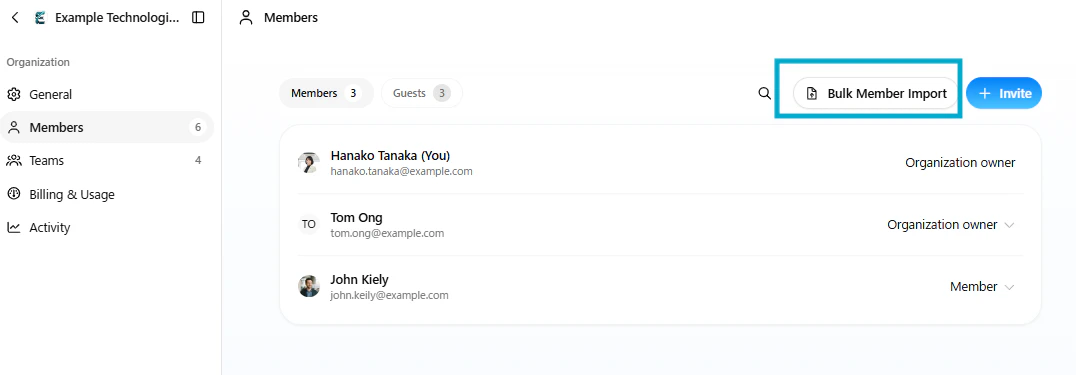
Bulk Member Import is available on the Enterprise plan.
Download, edit, upload
Start by downloading the current member list as a CSV. Edit it to add new members, change roles, or remove people — then upload it back. Jitera reconciles the entire organization against the file in one pass.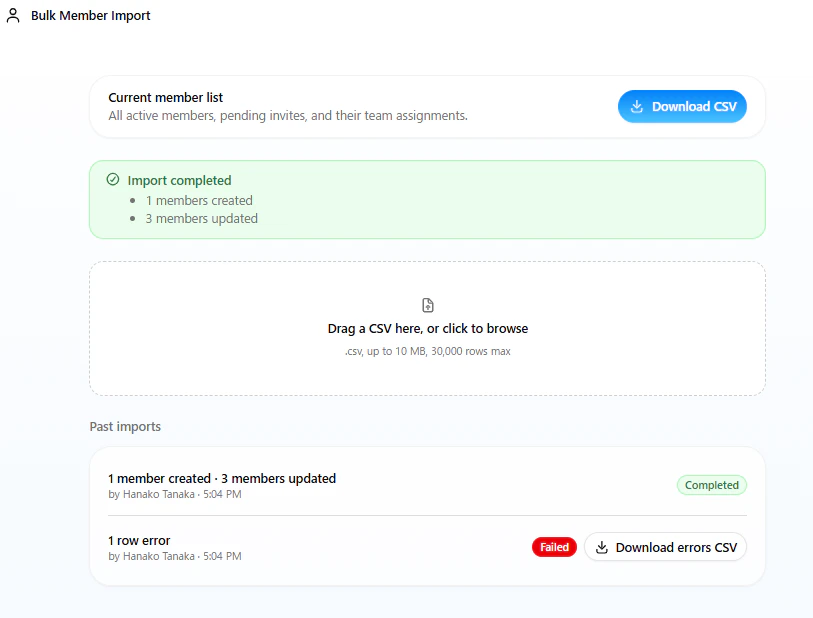
Teams and roles in one file
Each row represents a team membership. A member who belongs to multiple teams has multiple rows. Organization role, team name, and team role are all controlled from the same CSV — no need to manage them separately.
Clear error reporting
If any rows fail validation, the import is rolled back and you can download an error CSV — your original file with an extra column explaining each problem. Fix the flagged rows and re-upload.
Improvements
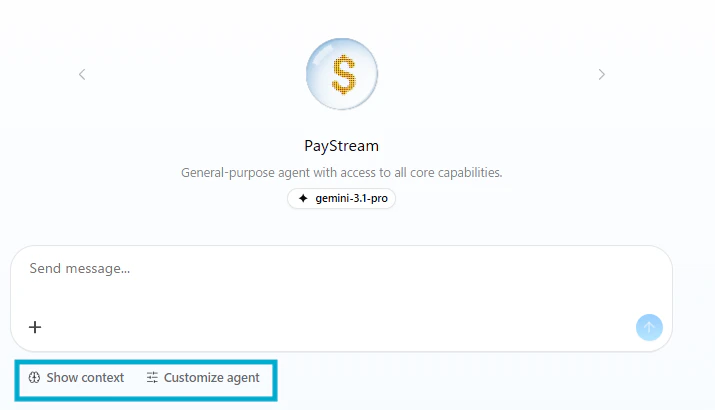
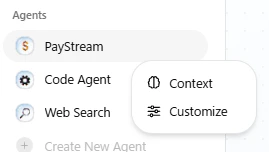
- [Chat] Context and agent settings are now easier to reach — access them directly from the chat header or right-click an agent in the sidebar.
Fixes
- [Chat] Fixed an issue where pasting multiple images from the clipboard resulted in all files being saved with the same filename.
- [Chat] Fixed an issue where the mention input field overflowed in team member thread chat.
- [Chat] Fixed an issue where the sidebar’s recent threads list showed a blank area when scrolled.
- [Chat] Fixed an issue where the token limit display for personal projects did not match the actual settings.
- [Common] Extended the screensaver activation time to 30 minutes of inactivity. Also fixed an issue where the scroll position was not correctly restored when revisiting a page.
Build your agent by answering a few questions — no setup required.
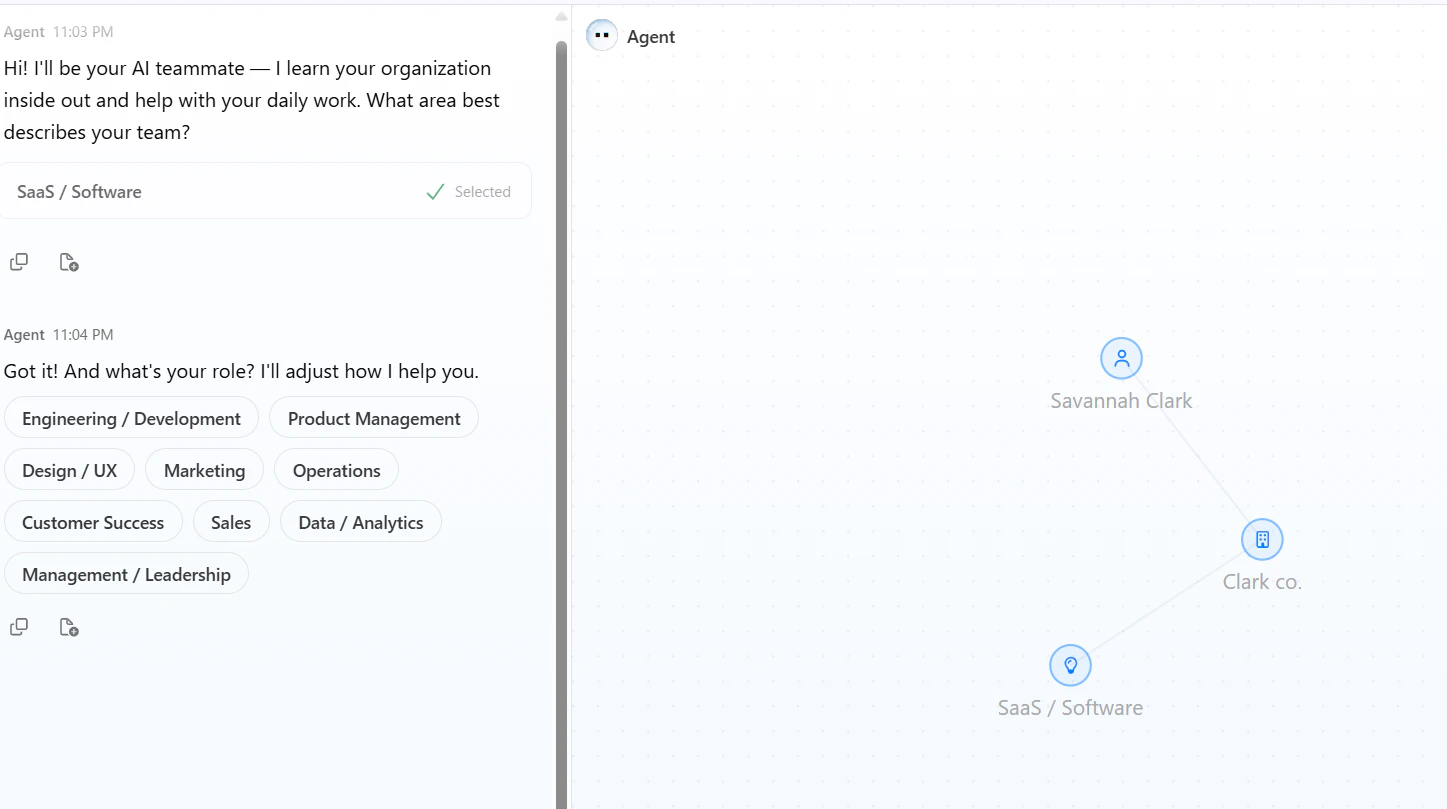
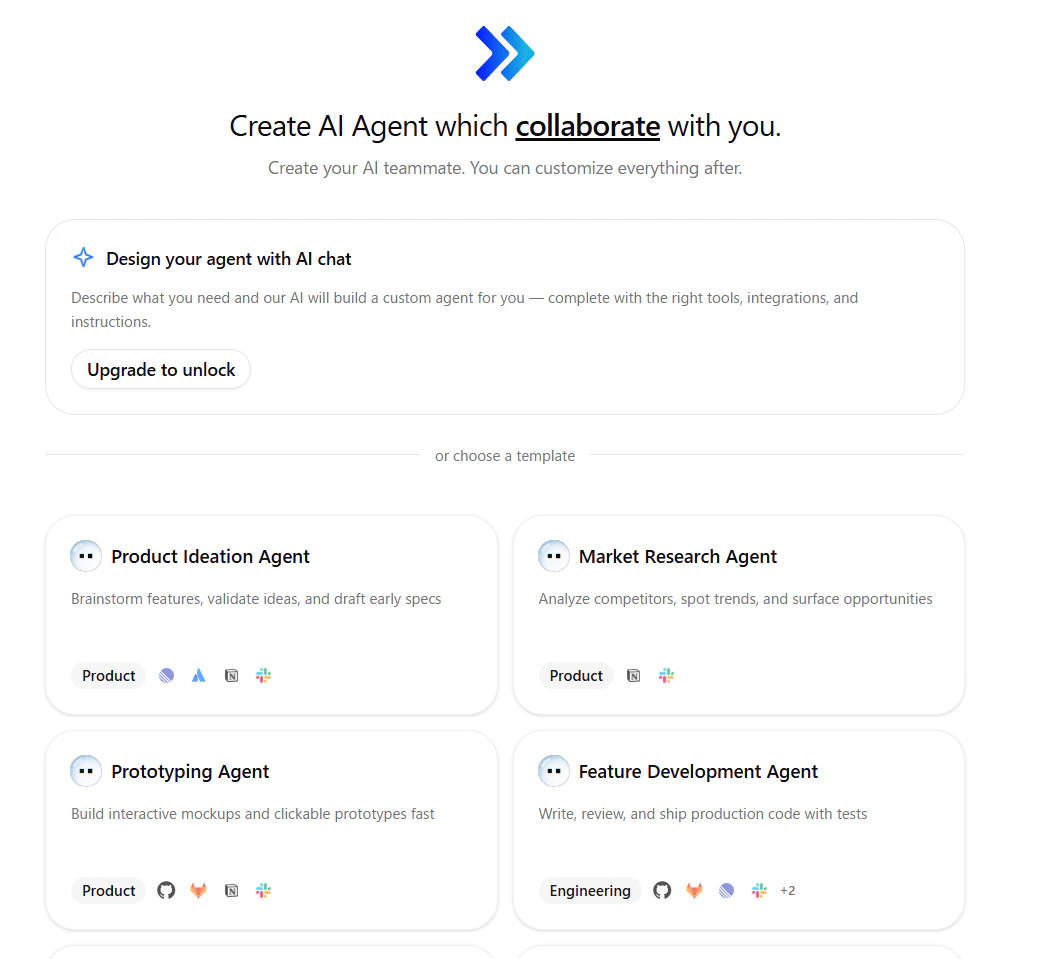
Answer questions, get your agent
Tell us about your team and what you need. Jitera builds a custom agent with the right tools and instructions — no manual configuration required.
Start from a template
Choose from pre-built agent templates for product, engineering, and more. Each template comes pre-configured with relevant integrations so you can get started immediately.
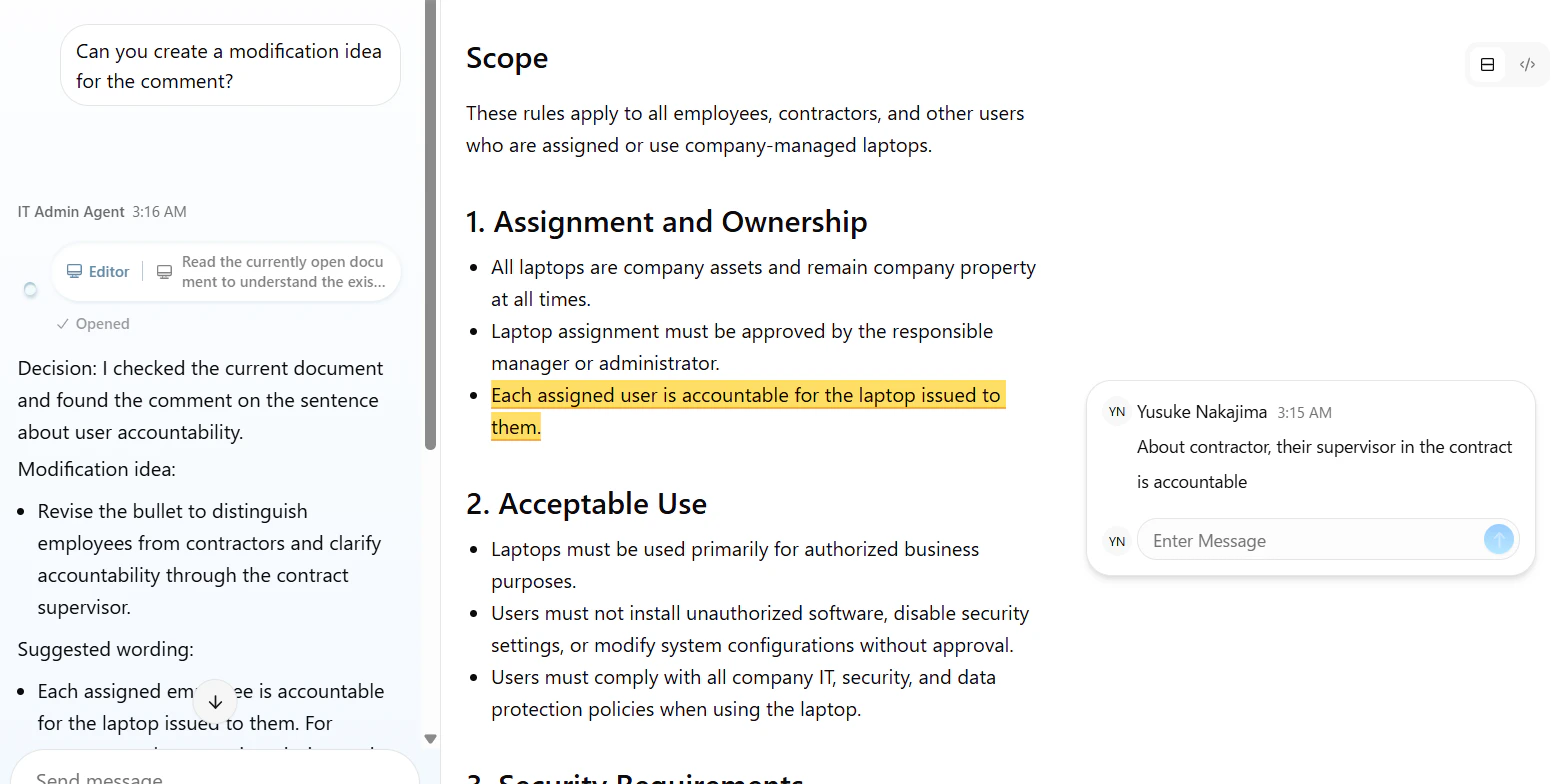
Leave a comment on a document — your agent will read it.
Improvements
- [Sidebar] The sidebar has been redesigned with a cleaner layout, making it easier to navigate between teams, projects, and agents at a glance.
- [Docs] Documents now support full-width display. Toggle it on from the document menu to give mermaid diagrams and wide tables the space they need.
- [Docs] The document parser has been updated to properly escape incorrect HTML tags.
Take full control of what your agent can do.
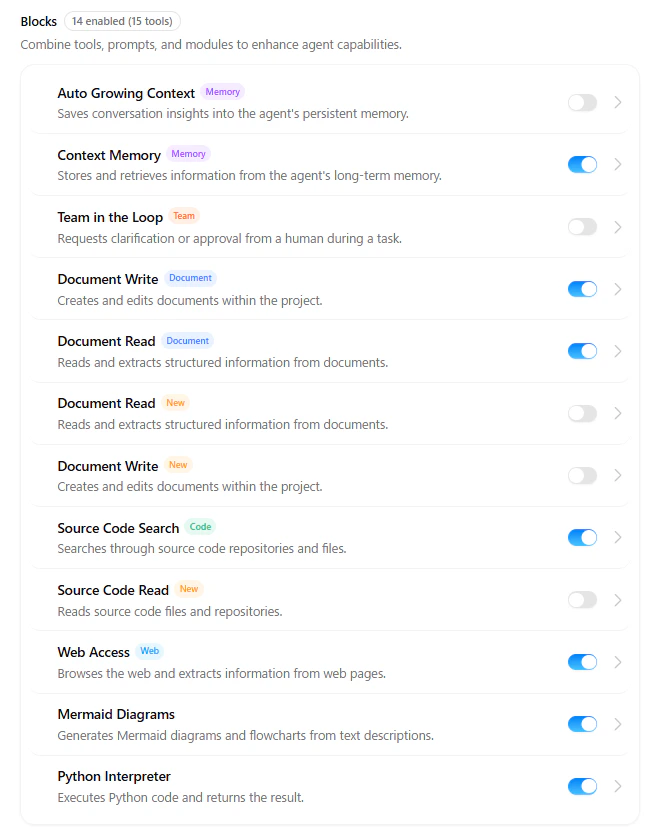
Customize each agent's capabilities
Turn individual capabilities on or off per agent — document write, web access, source code search, and more. Each agent does exactly what you intend it to do.
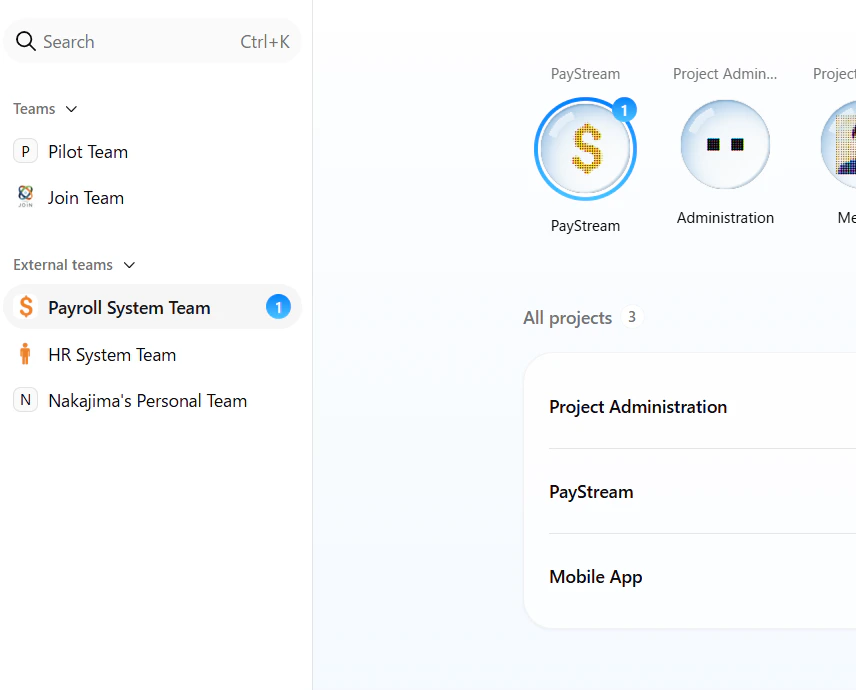
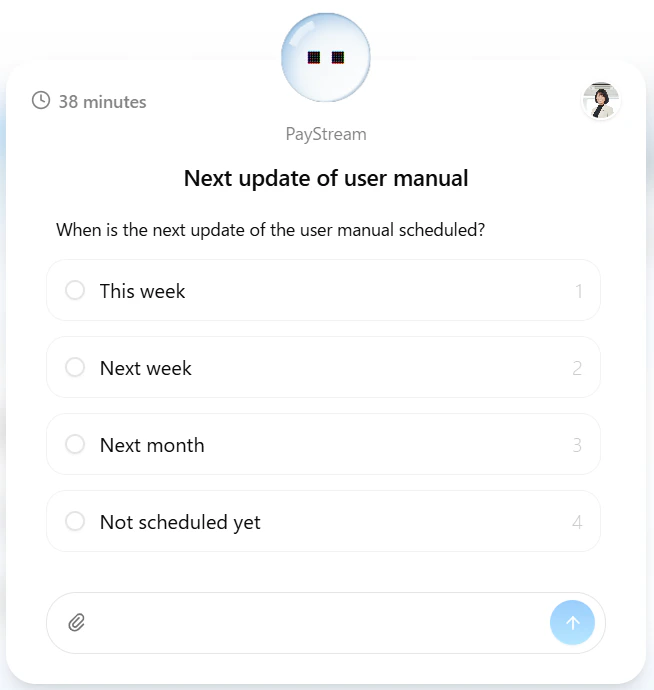
Team in the Loop — your agent asks the right person for you
When your agent hits a question it can’t answer on its own, it reaches out to the right person on your team — automatically. Based on the context it has built up, it identifies who to ask and sends them a question directly. You stay unblocked without having to chase down answers yourself.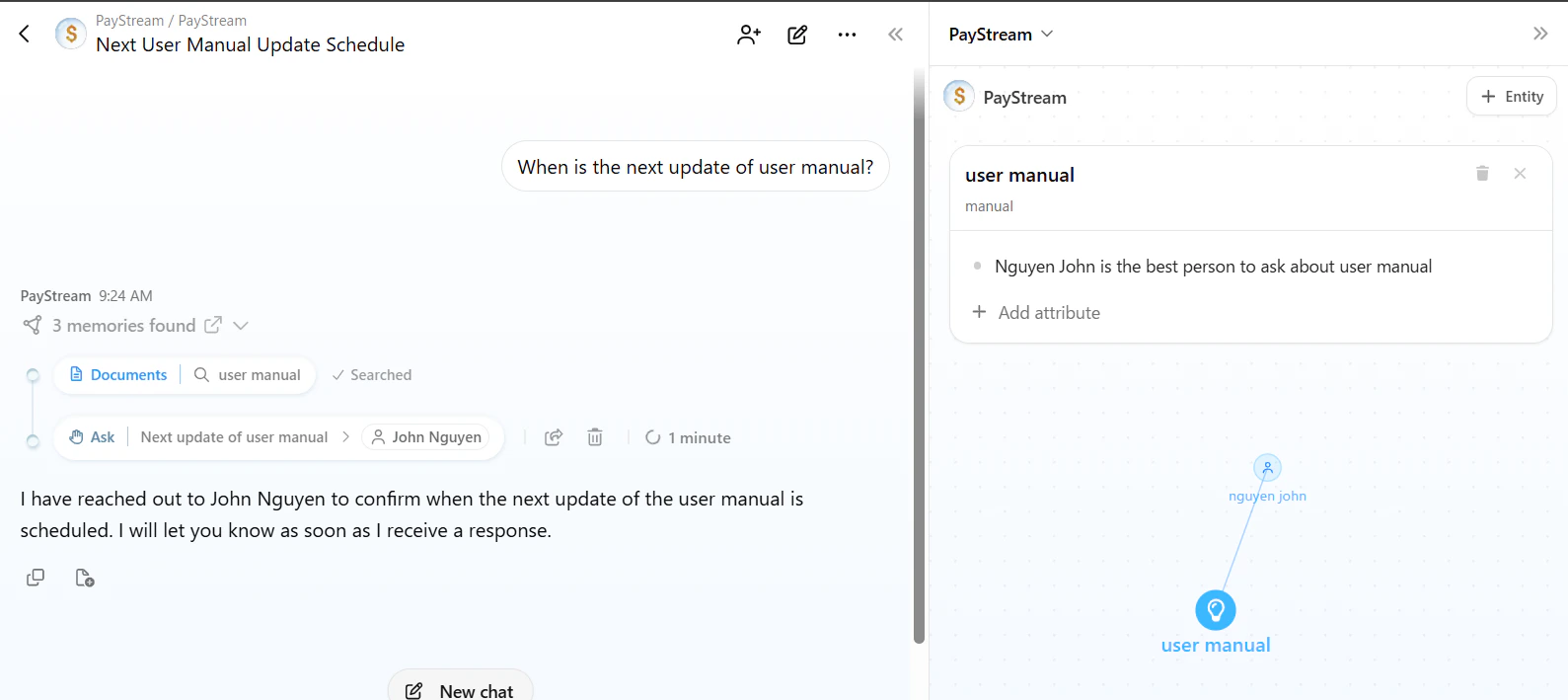
Auto Growing Context — context that builds itself
Your agent now updates its own context automatically as it works. No more switching to Learning Mode to teach it new information — the agent picks up knowledge from your conversations and keeps its understanding current on its own.
Improvements
- [Agent]
claude-opus-4.7is now available in Pro/Enterprise plan - [Docs] Markdown documents now have a content limit (250K characters in the editor / 500K in raw markdown) to prevent performance issues with extremely large files.
- [SSO] SSO users no longer need to complete a redundant MFA check — the sign-in flow is now smoother and faster.
- [SSO] Improved the SSO login experience when a user was removed and later re-invited.
- [SSO] Passwordless users are now guided to reset their password if SSO is no longer available.
- [Auth] Users are logged out automatically after inactivity.
Fixes
- [Docs] Fixed an issue where exporting all documents from the root folder didn’t work.
- [Chat] Claude Sonnet 4.5’s context window has been reduced to 200K tokens following Anthropic’s decision to end the 1M token beta. For workloads that require a 1M context window, Claude 4.6 is now the recommended model with official 1M support.
Improvements
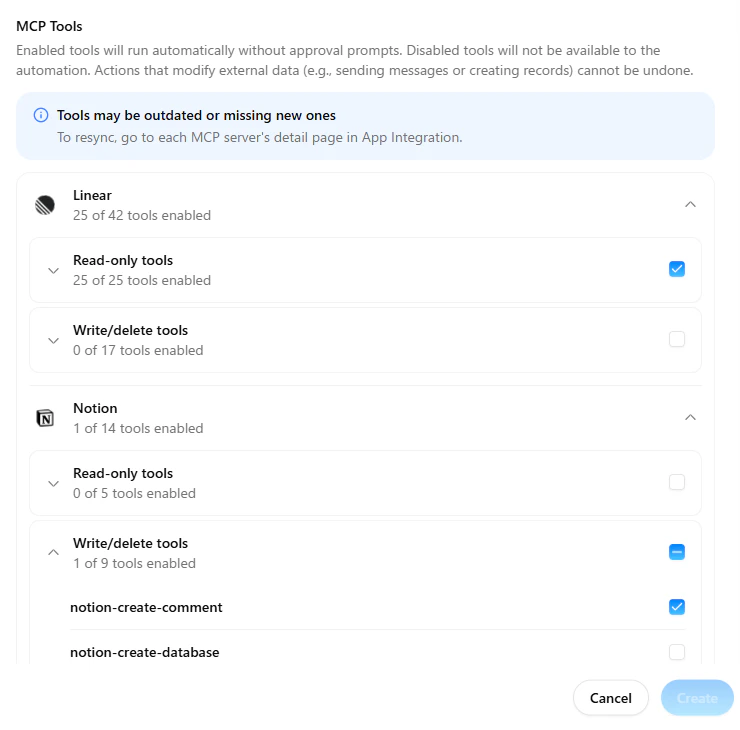
- [Agent] You can now choose which MCP tools are available in each Automation job. Pick only the tools that job needs — anything disabled in your MCP settings is automatically excluded, giving you tighter control over what your automations can do.
Fixes
- [Agent] When an Automation job’s MCP server is disconnected, you now get a clear error message right away instead of the job silently switching to web search without your knowledge.
- [Agent] MCP tools are no longer shown in the Automation setup dialog when External MCP is disabled for your workspace, keeping the UI clean and consistent with your settings.
- [APPS(MCP)] Fixed an issue where the browser tab would unexpectedly close when connecting an MCP server right after signing in via SSO — no more needing to refresh the page first.
Enterprise SSO, now easier to configure.
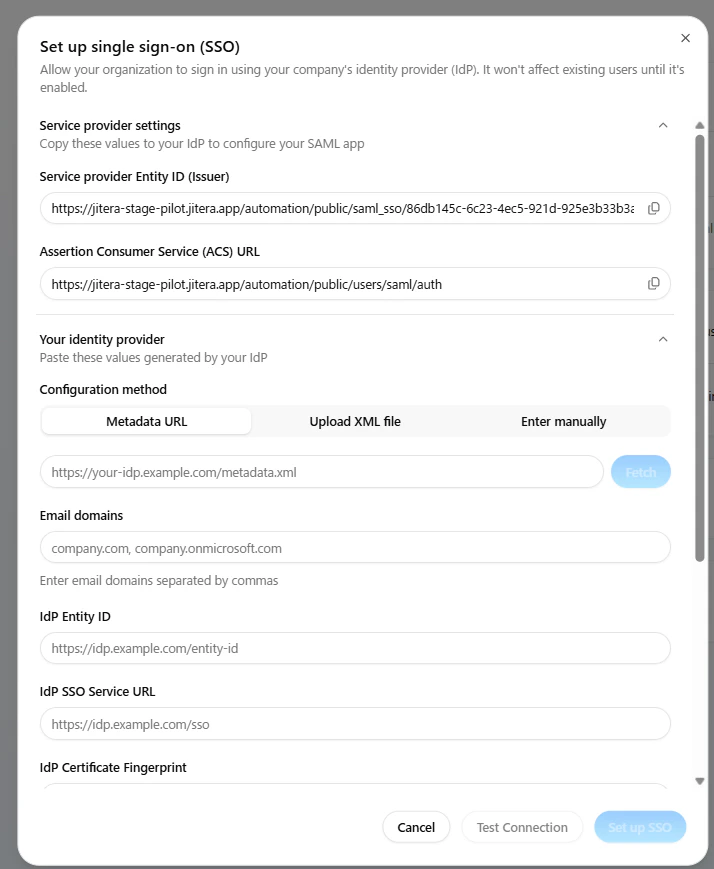
SSO is available exclusively on the Enterprise plan.
What you can do now:
Three ways to set up SSO
Paste a metadata URL, upload an XML file, or enter details manually. IdP Entity ID, SSO Service URL, and certificate fingerprint are auto-filled instantly
Test before you go live
Verify your SSO setup by signing in with your identity provider and confirming user attributes are correctly extracted — before flipping the switch.
Never get caught by an expired certificate
See exactly when your IdP certificate expires. Amber warning at 30 days, red at 7 days or expired. Re-fetch the metadata URL to update instantly.
Improvements
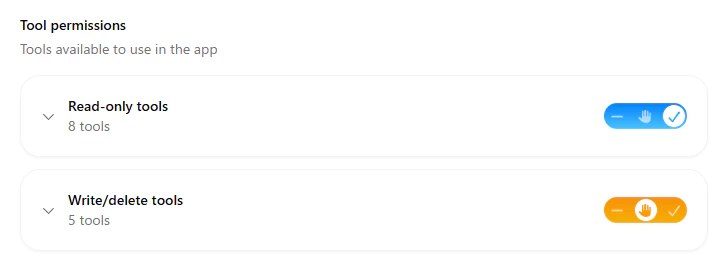
- [APPS(MCP)] MCP tools are now automatically grouped into Read-only and Write/delete, with bulk permission updates available per group.
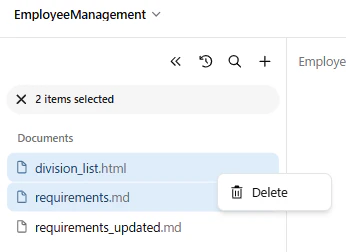
- [Document] You can now delete multiple selected documents at once from the document tree
- [Agent] Long conversations now run more smoothly and efficiently.
Fixes
- [Common] Fixed an issue where login sessions would unexpectedly expire.
- [Document] Folder names with different letter casing are now correctly preserved in the document tree.
Your agent’s context, now editable from the UI.
[[wiki-style links]], and see changes reflected in real time as your agent learns during conversations.Each agent maintains its own isolated context, so your documentation agent and code agent build specialized knowledge without interference. Share direct links to specific nodes and correct anything the agent got wrong — all without leaving the UI.Your agent’s context, your control.Other New Features
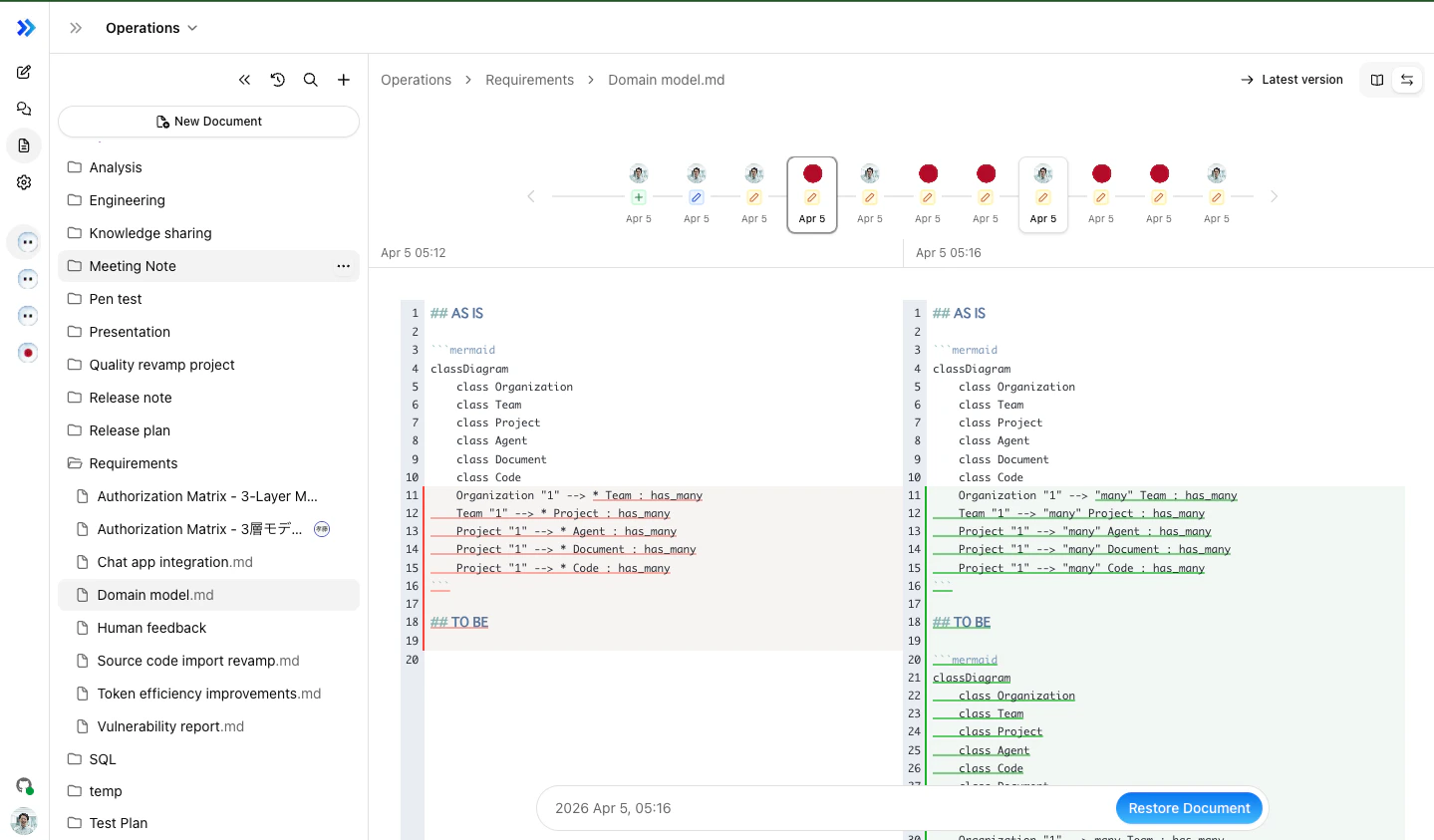
Flexible Document Version Comparison
Improvements
- [Agent] Chat Thread Compression — Long chat threads are now automatically compressed, reducing token usage while preserving context
- [Agent] Image-Only Prompt Support — Send images without text as prompts to agents
- [Agent] Webhook Automation —
http.bodyis now passed to the agent prompt, enabling richer webhook-driven workflows - [Agent] Group Chat Improvements — Parallel responses, smarter response decisions, and chronological message ordering
- [Agent] Web Push Notifications — Browser notifications for group chat activity
Fixes
- [Docs] Fixed drag & drop import for PDF and Excel files
- [Agent] Fixed agent icon resetting unexpectedly
Your organization, secured together.
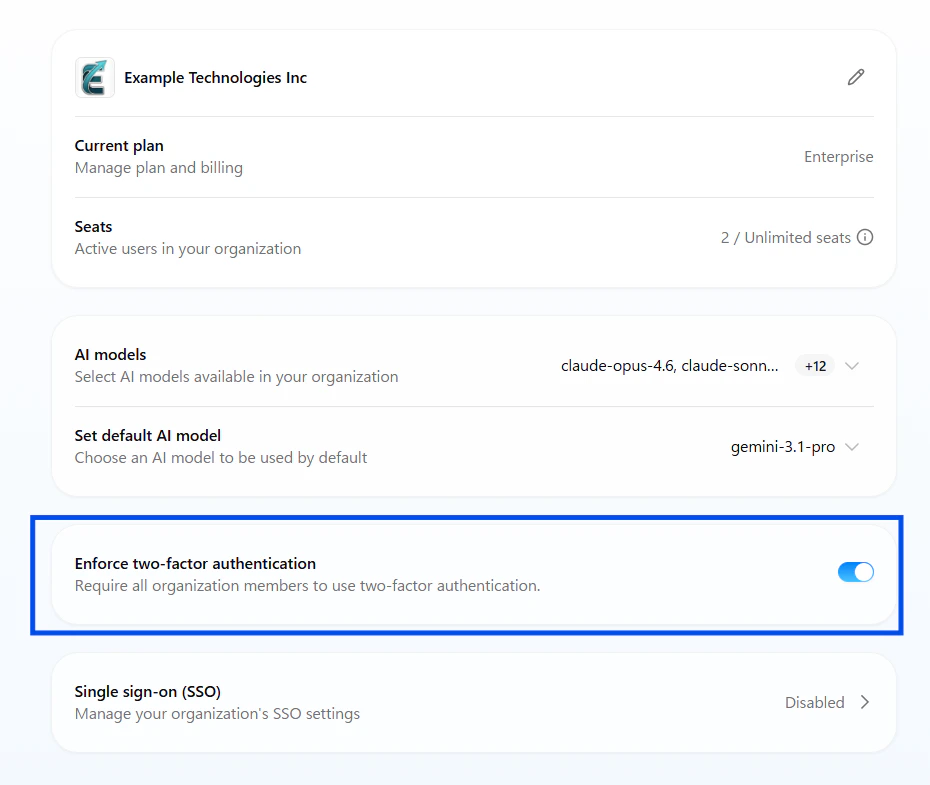
Other New Features
Try our New Side bar in preview
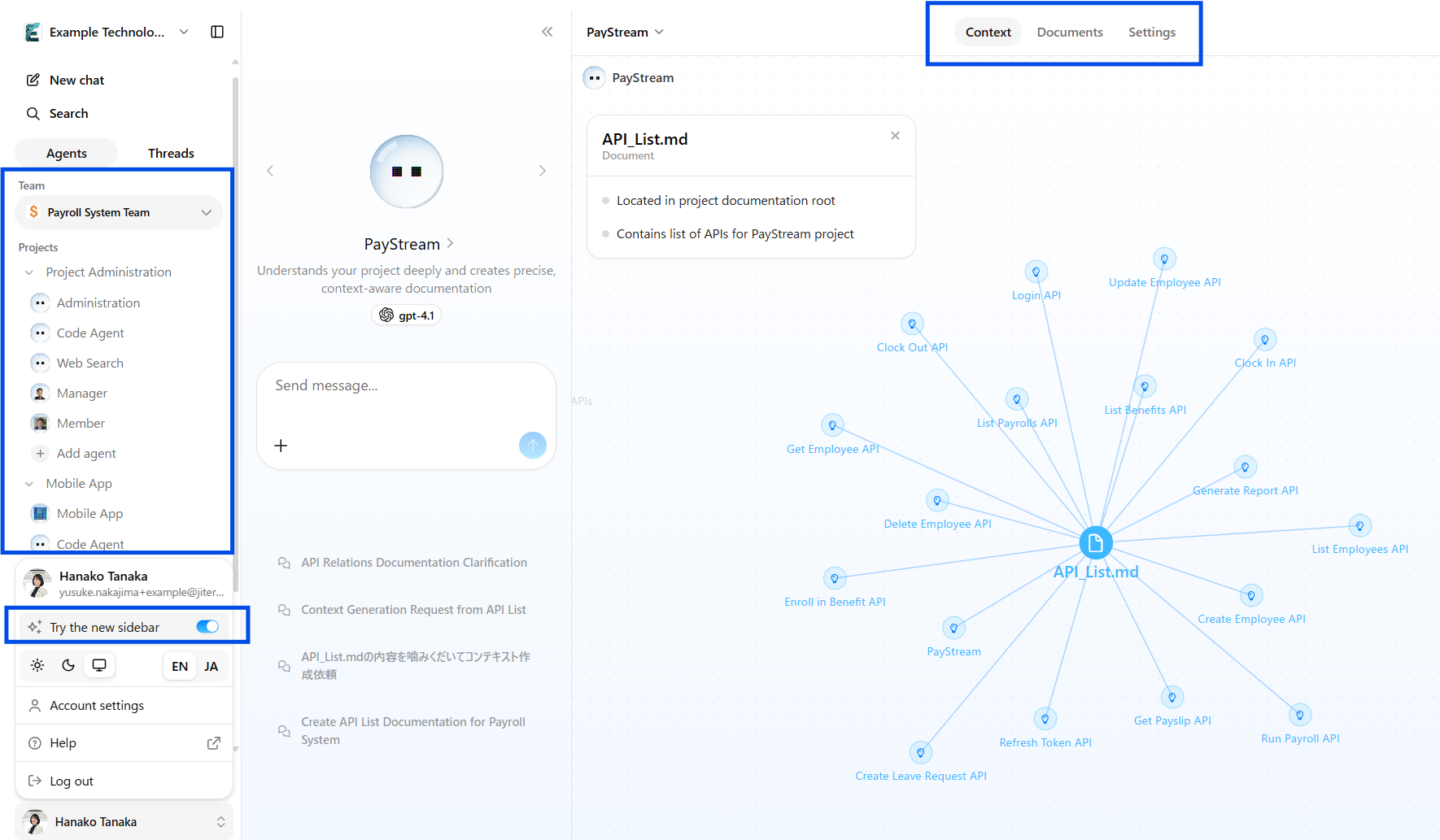
You can now directly call the agents from your side bar and you can switch the information like Context and Documents in the same area.
Improvements
- [Common] Extended session duration from 1 day to 14 days You will now remain signed in for up to 14 days, reducing the need for frequent re-authentication.
- **[GitHub/GitLab] **Disconnect GitLab account when no repositories are imported You can now disconnect a GitLab account when no repositories have been imported. This mirrors the existing behavior already supported for GitHub, giving you more flexibility in managing connected integrations.
Your team, editing together. No more “wait your turn.”
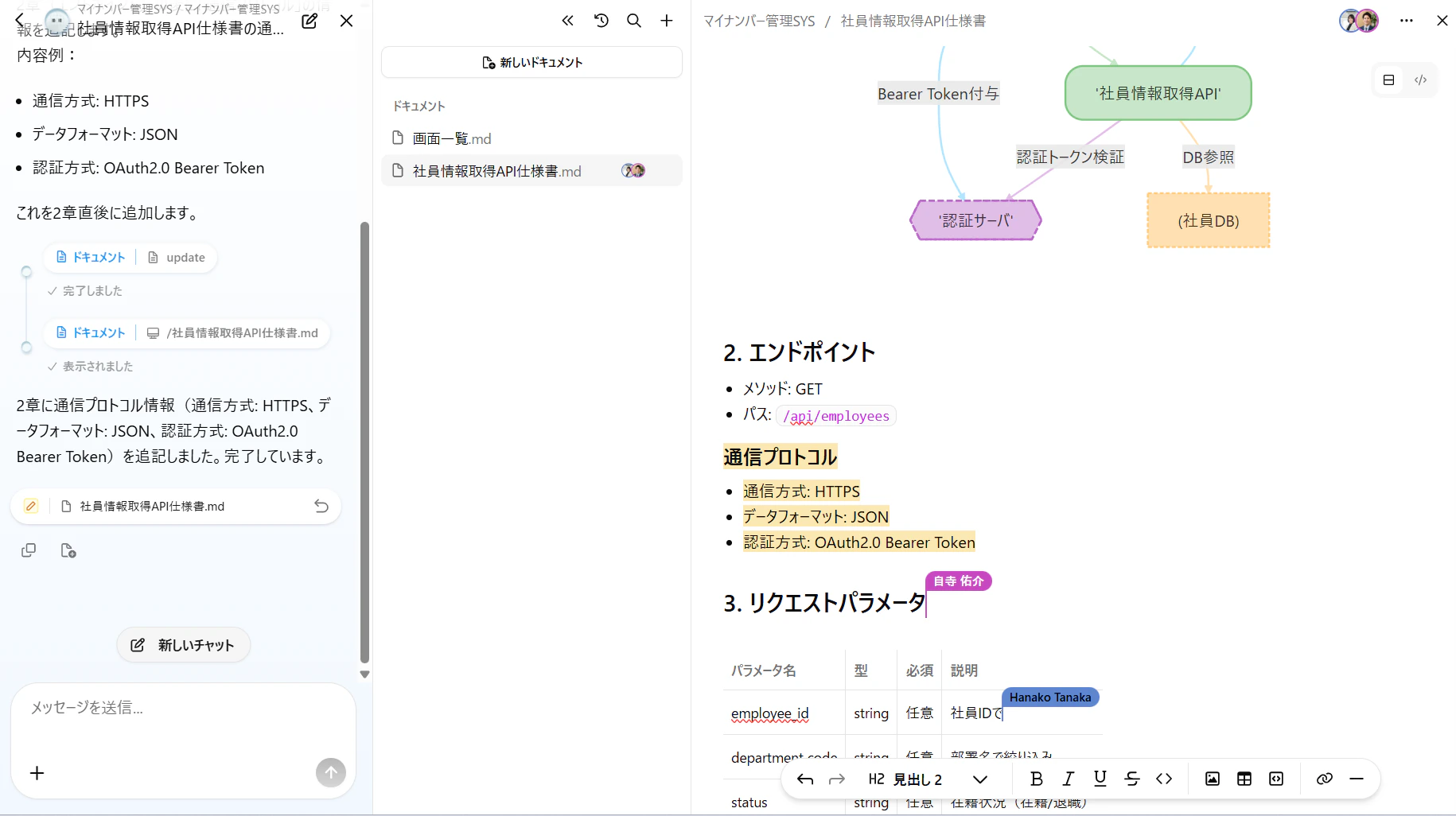
What this means for you:
Edit together, actually together
No more taking turns. Everyone edits simultaneously. See exactly where your teammates are working—their cursor, their changes, in real-time. Collaboration that actually feels collaborative.
AI that everyone can see
When your AI agent updates documentation, the whole team sees it happen. Live. Watch it generate, review on the fly, revert with one click if it goes off track. Full transparency, full control.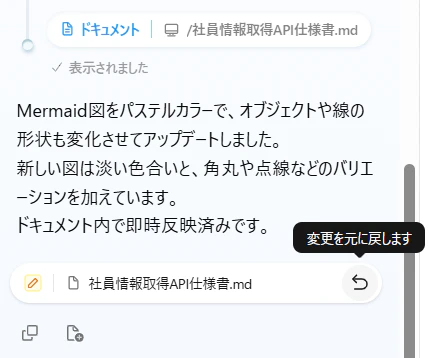
Never lose work again
Every 5 minutes, we save a snapshot. Someone accidentally deleted that critical section? Restore it. Want to see what changed between Monday and today? Side-by-side diff view shows you exactly what’s different.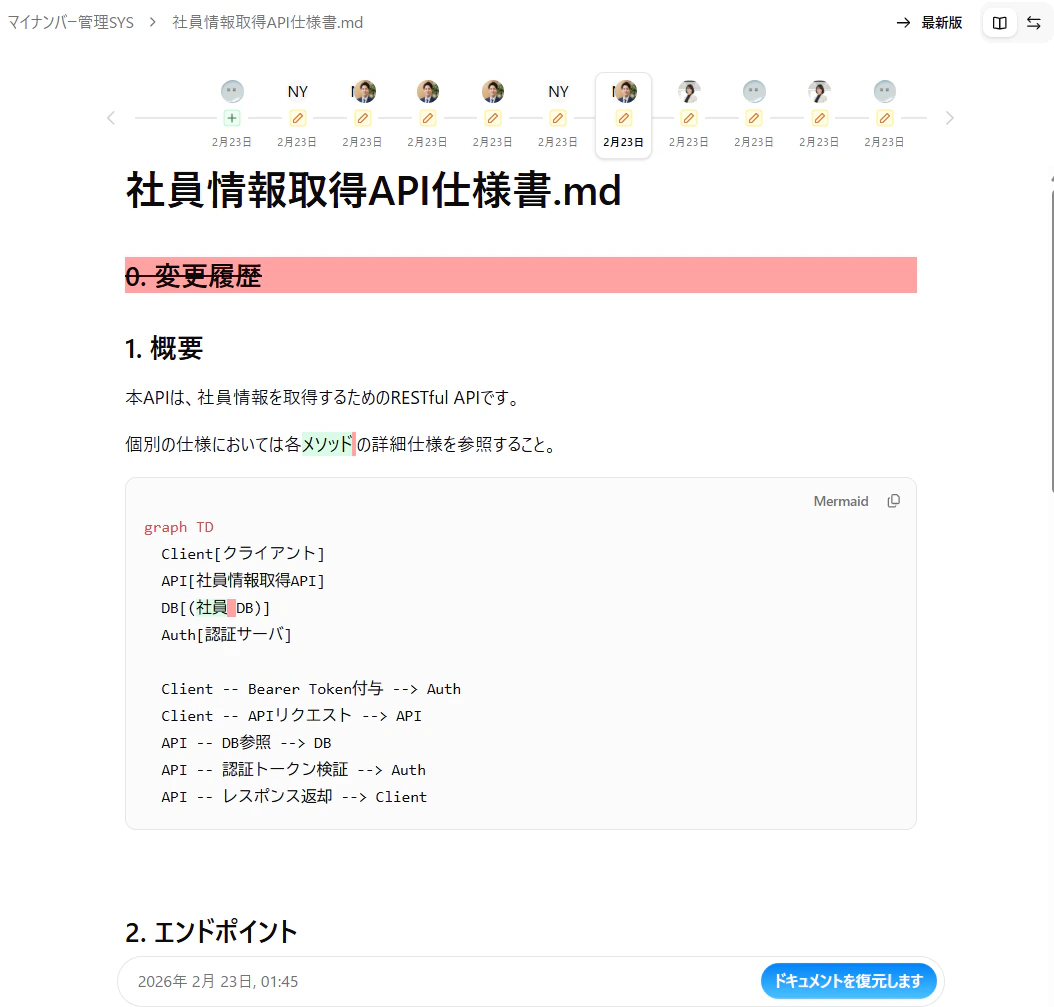
Just works. No setup. No configuration. Open any document and start collaborating. Your existing docs, your existing workflow—now multiplayer.
Other New Features
Claude 4.6 Models Now Available
You can now select Claude 4.6 Sonnet or Claude 4.6 Opus in chat settings. These models offer improved reasoning and code generation capabilities. To enable these models for your organization, please contact your Customer Success Manager.Improvements
- [Chat] Enhanced Document Updates: Document update behavior from chat has been improved, resulting in more accurate and context-aware edits
- [Docs] Improved Folder Operations: You can now open files in a new tab by CTRL/CMD + double left-clicking from the file tree
Fixes
- [Common] SSO Multi-session Support: SSO users can now use multiple browser sessions simultaneously
- [Docs] Fixed Folder Name Error: Resolved an issue where incorrect duplicate errors occurred with folder names that don’t exist in the list
Homepage and Account Management UI Renewal
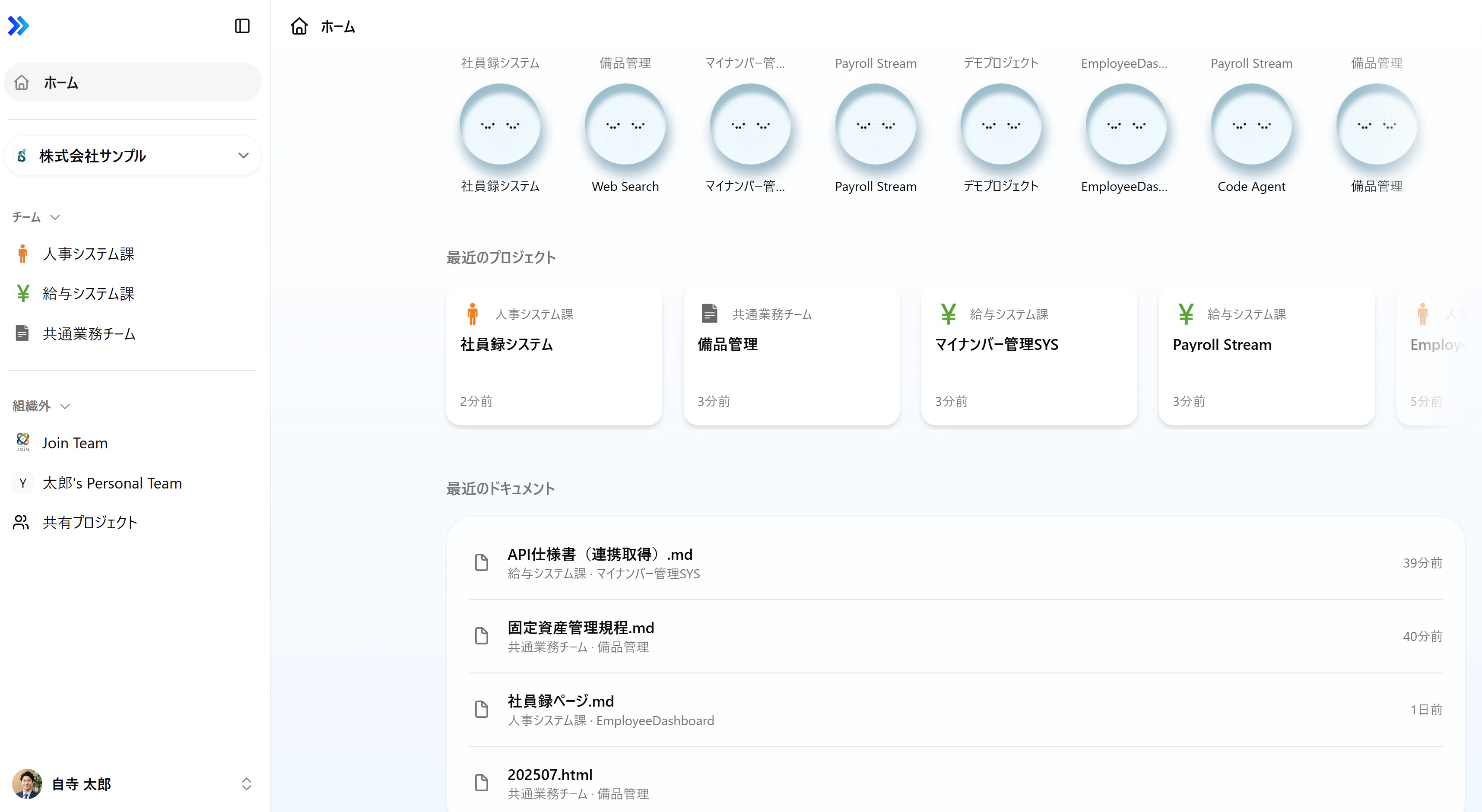
Refreshed Homepage
Recent agents, projects, and documents consolidated in one place. Quick access to everything you need
Multi-session Support
Support for simultaneous login up to 10 sessions. Continue work uninterrupted when switching devices or browsers
Organization-level Member Invitation
Invite members directly from organization settings. Team onboarding becomes smoother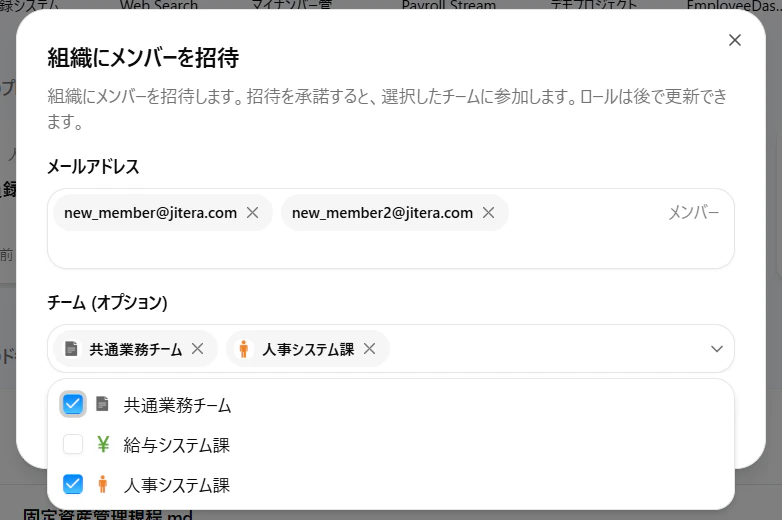
Dark Mode Support
Login, home, organization, team, and account pages now support both dark mode and light mode
Other New Features
Guest Management Tab Added
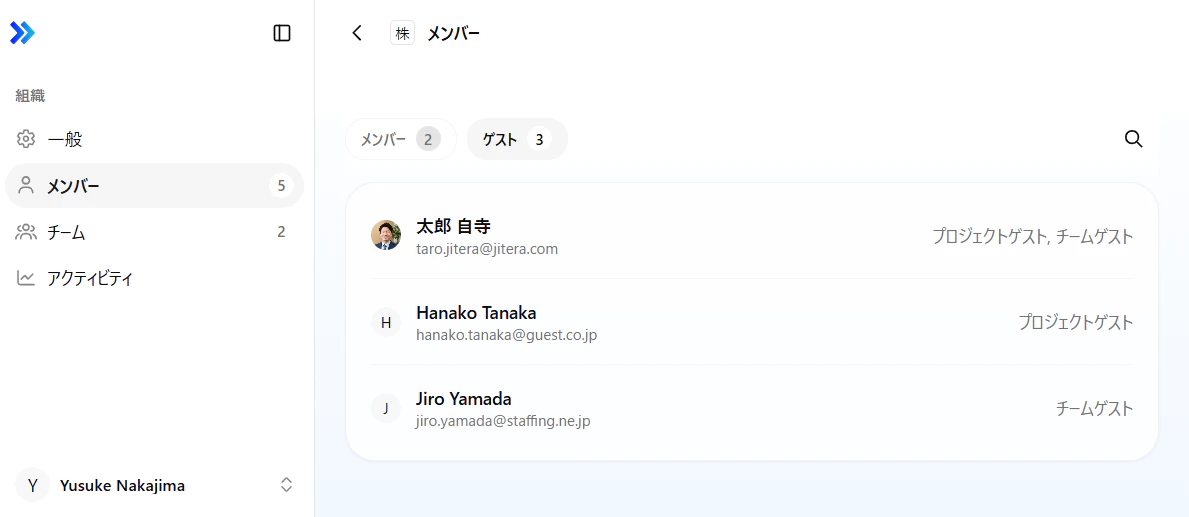
Specification Change
Auto-generated Document Generation Rate Limit
For stable service operation, we have limited the number of auto-generated document generations to 5 times per team per month (including new generation and regeneration). The count resets at 9:00 AM on the 1st of each month.This limit allows us to provide stable service to all customers. If you need more generations, please consult with your Customer Success Manager.
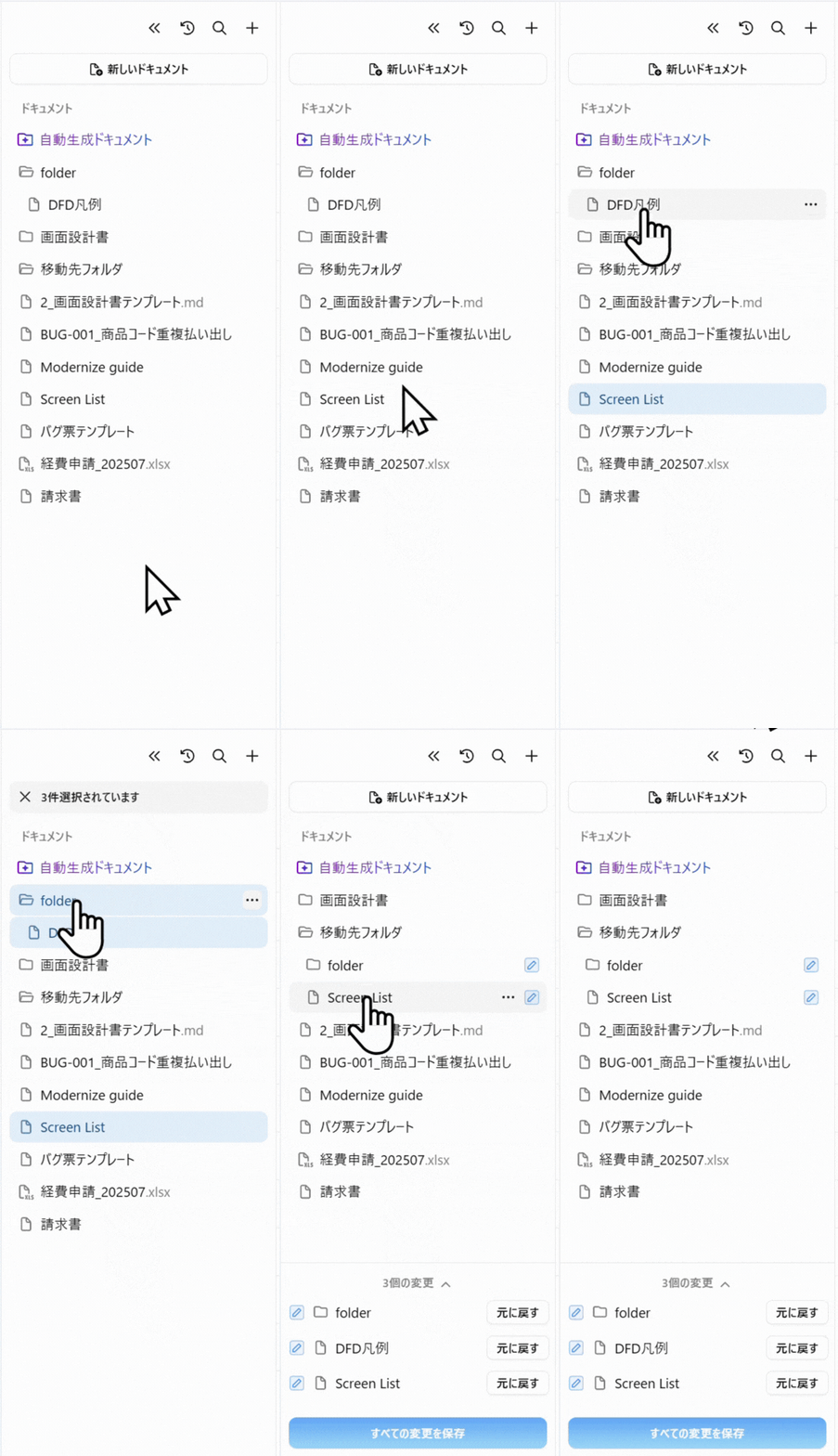
Drag & Drop File Movement
Improvements
-
[Chat/Docs] Google Gemini Models Japan Hosting: Google Gemini 2.5 Pro and Google Gemini 2.5 Flash are now hosted in Japan (switched from Google AI Studio to Vertex AI). This improves response speed and data residency
For Gemini 3 Pro, Japan hosting is not yet supported by Google, so it will be changed once supported
Fixes
- [Eclipse] Windows Login Issue: Fixed issue where login was not possible in Eclipse on Windows environment
- [Eclipse] Copy & Paste Issue: Fixed issue where copy & paste from past chats was not possible in Eclipse
- [GitHub] Auto-sync Issue: Fixed issue where automatic synchronization was not occurring when code changed
Fixes
- [Chat] Multiple File Attachment Support: Fixed issue where chat failed to recognize when multiple files were attached, and multiple file attachments are now available
- [Chat] UI Display Fix: Fixed issue where chat thread titles overlapped with document tabs on large screens
- [Docs] Export Button Display: Resolved issue where document export button was not displayed when folder names contained dots
- [CLI] Timestamp Update: Fixed issue where timestamp was not immediately updated after
jitera synccompleted - [GitLab] Error Message Fix: Fixed issue where some error messages displayed “GitHub” instead of “GitLab”
Improvements
- [Docs] Direct Folder Name Editing: You can now directly edit folder names when creating new folders, making renaming smoother
- [Docs] PDF Export Improvements: Improved font reproduction when exporting to PDF
- [Common] Performance Improvements: Performance improvements implemented for document and chat-related processes
Fixes
- [Docs] Excel File Display: Fixed issue where buttons were not displayed when hovering over Excel files with long file names
- [VS Code] Login Issue: Fixed issue where login to VS Code extension was not possible
- [Chat] Line Break Preservation: Improved issue where line breaks disappeared in some chat responses
- [Chat] System Prompt: Improved issue where system prompts were output to chat-created documents
Bulk Export Non-Markdown Files as HTML
Export documents including PDF and Excel files in bulk as HTML for easier sharing and archiving. Previously imported HTML files are now correctly recognized as their original format when re-imported.What’s new:Bulk Export to HTML
Export multiple non-Markdown files at once, preserving format and structure
Smart File Recognition
HTML files are automatically recognized as PDF or Excel when re-imported
Maintain Your Workflow
Export, share, and re-import without losing file type information
Enhanced OAuth Authentication
Sign in more securely with improved OAuth authentication options. OAuth tokens are now encrypted and stored with enterprise-grade security.Key Capabilities:- Multiple authentication options for flexible access
- Encrypted token storage with session-level security
- Seamless integration with existing accounts
US Server Now Available
Access Jitera from our new US-based servers for improved performance and compliance. The US Pilot application is now enabled, providing faster access for teams in North America.What This Means:- Faster response times for US-based teams
- Improved data residency options
- Enhanced security with region-specific compliance
Improvements
- Files are now organized more intuitively in the file tree
- Chat messages are easier to view and understand
Fixes
- Session notifications no longer appear multiple times
- Team selection now works correctly on the project page
- Line breaks are preserved when editing documents
- HTML documents now update correctly in chat
- AI model counts display accurately Partner
- Improved security and configuration reliability Partner
Improvements
-
[Chat] Prompt Input During Response: Changed to allow entering the next prompt while the agent is responding
Chat submission occurs after the agent response is complete
- [Docs] Export Button Control: Export button is now deactivated when there are no documents to export
Fixes
- [Chat] System Prompt Inclusion: Resolved issue where system prompts were included in generated documents
- [Docs] Markdown Import: Fixed issue where imported markdown files were added to the currently selected PDF file
- [CLI] Sync Status Display: Fixed issue where sync status and last sync time were not correctly displayed in Web UI after CLI sync
- [Docs] URL Link Display: Fixed issue where Jitera Studio URL suddenly appeared in document links within documents
- [GitLab] Branch Selection: Fixed issue where the system always used the default branch even when the user selected a different branch during import
- [Team] Member Invitation: Fixed issue where the “Add Members” button became unclickable when clicking “Select All” during member invitation
-
[SSO] Multi-organization Support: Allowed SSO login to multiple organizations under one domain
Example: When a single company uses multiple organizations. Multiple organizations can now be linked to one Entra ID domain
New Features
- [Source Code] .IDL2 Extension Support: Now supports .IDL2 extension when importing source code
- [Docs] Raycast Image Paste: Images copied from the Raycast app can now be pasted directly into the editor (Mac)
- [Docs] Dynamic Document Regeneration Button: Regeneration button for dynamic documents has been implemented
Improvements
- [Docs] Link Popover Control: When a link is at the beginning of a document, the link popover no longer automatically displays when opening the document
- [Docs] Search Field Retention: The input field no longer disappears when deleting search words in documents
- [Docs] Encoding Improvement: Resolved encoding (garbled text) issues when opening Markdown files downloaded from Jitera in Microsoft Word
- [Docs] Automatic Title Selection: When creating a new document, the title is automatically selected and focused, enabling quick title changes
- [Docs] Open in New Tab: You can now open documents and folders in another tab by CTRL + left-clicking
- [Docs] Table Editing Improvements: Table operation menus are always displayed, making it easier to edit large tables
- [Performance] History Compression: Added document history compression feature for improved performance and storage efficiency
Fixes
- [Git] Invited User Sync: Fixed issue where invited users could not re-sync linked repositories
- [Docs] File Name Character Restrictions: Fixed issues with importing files containing invalid characters (< > : ” / \ | ? * etc) (converted to ”_”)
-
[Docs] History Stability: Made document history feature more stable
Some issues are still under investigation
- [GitHub] Sync with Expired Token: Fixed issue where auto-sync was not possible when the access token had expired in one of two projects using the same GitHub repository
- [Account] Password Change: Fixed issue where the save button did not become enabled on the password change screen
New Features
Bulk Document Import Feature
Added import functionality for ZIP-compressed HTML and Markdown files. Folder hierarchies are also reproduced, allowing existing document structures to be migrated as-is.- [Chat] Azure OpenAI GPT-5.2 Support: Now supports Azure OpenAI GPT-5.2 model (beta)
Fixes
- [CLI] File Deletion Permission Error: Fixed issue where CLI incident errors occurred when there was no permission to delete files
- [Admin Screen] Owner Invitation Error: Fixed issue where an unknown error string was displayed when reaching maximum seats during owner invitation as Super admin
- [Admin Screen] AI Model Setting Display: Fixed issue where “Required” was displayed when checking/unchecking “Seats” for AI models as Super admin
New Features
- [Source Code] .MBR Extension Support: Now supports the new extension (.MBR)
- [Docs] Language Model Selection: You can now select a language model when generating auto-generated documents
Improvements
- [UI] Legacy Screen Redirect: Clicking GitHub/GitLab connection on legacy screens now redirects to the new UI URL
- [Chat] Reduced Gemini Errors: Reduced error occurrences during congestion when using Gemini
Fixes
- [Auth] Login Issue: Fixed issue where login was not possible after version upgrade
- [Extension] Error Display: Fixed error display related to extensions
- [Eclipse] Code Application: Fixed issue where code could not be applied in Eclipse
- [Docs] Title Save: Fixed issue where content was not saved when updating document title in code view
- [Account] Avatar Display: Fixed avatar display issues for Japanese users
- [Docs] PDF Import: Fixed display format issues when importing PDFs
- [Chat] Message Duplication: Fixed issue where the same user message was displayed multiple times when clicking “Run Task”
New Features
- [Team] Bulk Team Invitation Feature: Implemented bulk team invitation feature (with role assignment). You can invite multiple team members at once and assign appropriate roles to each
- [Chat] Claude Opus 4.5 Support: Added the latest Claude model “Claude Opus 4.5”
Improvements
- [Performance] Reduced Error Frequency: Improved frequency of “unexpected application errors” occurring when scrolling organization team member lists and project lists
Fixes
- [Docs] Timeout Issues: Fixed timeout issues in some auto-generated documents and enhanced stability
- [Docs] Table Tags: Fixed issue where
<br>tags inside tables disappeared during Markdown conversion - [Chat] Response Duplication: Fixed issue where AI responses were duplicated in document chat
New Features
[Docs] Bulk Export All Markdown & HTML Files
You can now export all Markdown and HTML files in the document folder at once, making backup and sharing easier. Folder export events are recorded in the audit log.User Manual Link Added
Links to appropriate user manuals have been added according to user language settings, providing immediate access to needed information.Organization Default LLM Settings
Organization owners and super administrators can now set default LLMs at the organization level. Unified AI model settings across the entire organization are now possible.Organization Activity Visualization
Organization administrators can now check the number of chats for users, teams, and projects in their organization for a specified period and export to CSV. This makes it easier to identify active users and projects with good adoption.Improvements
- [Chat] Reduced Initial Agent Wait Time: Wait time reduced by approximately 300ms to 3 seconds depending on the situation
- [Chat] Google Gemini 3 Pro Support: Support for the latest model including Thought Signature feature
- [Chat] GPT-5.1 Support: GPT-5.1 is now available for reasoning and chat models
- [Common] Improved Service Stability: Performance and reliability have been improved
New Features
Latest AI Models Available
The following latest LLMs are now available for selection (excluding non-domestic host models if excluded by organization owners):- GPT-5: OpenAI’s latest model (reasoning feature off)
- GPT-5-mini: Fast and efficient lightweight version
- GPT-5-nano: Fastest ultra-lightweight version
- Claude 4.5 Haiku: Anthropic’s fast model
- Claude 4.5 Sonnet: Balanced performance
[CLI] New Device Connection Command
Added a new commandjitera connect to connect new devices to existing CLI projects. Work from multiple devices becomes smoother.Improvements
- [Chat] Plan Mode/Repeat Mode: You can now repeat the same action multiple times in chat Plan mode
- [Common] Internet Connection Retry: Added retry functionality when internet connection is lost, improving stability
- [Eclipse] Copy & Paste Support: Copy & paste is now possible in Eclipse, and pasted mentions are converted to actual mentions. Partial match mentions also supported
- [Chat] Improved Error Messages: Correct error messages from boost are now displayed
- “Context window limit exceeded”
- “Invalid request”
- “Rate limit exceeded”
- [Docs] Dynamic Document Generation Control: Dynamic document and database generation are disabled when Git is not authenticated
- [Docs] Increased PDF Upload Limit: PDF upload limit increased to 50MB
.mcf- Btrieve format database file.pgc- PostgreSQL Embedded SQL (ECPG) program.slx- MATLAB Simulink model file.edp- XML format file.mff- Binary data file (used in scientific measurement and data processing)
Fixes
- [Chat] Mention UI: Fixed mention UI display issues when document titles contain parentheses
- [Docs] HTML Styling: Fixed issue where HTML styling was not always applied in Editor View
- [Git] Branch Display: Fixed issue where “mainmain” was displayed for empty repository branches
- [Chat] Traceability Link: Fixed issue where Docs traceability links redirected to the old UI
- [Docs] Export Issue: Fixed issue where .md export failed in v3 UI and v2 UI when images with Jitera internal links were present
- [Chat] Mention Text: Fixed issue where random text appeared in mentioned files in response messages
Project Screen Renewal
The project screen has been completely renewed. The previous UI can continue to be used from “Legacy Version”.User manual will be updated sequentially
New Features
Light Mode / Dark Mode Support
Switching between light mode and dark mode is now possible. Project list screen and settings screen will provide light mode later.Official Release of Context Feature
By selecting “Learning Mode” in chat, you can teach the agent various knowledge about the project and specify agent behavior. The created knowledge graph can be viewed from “View Context” in the chat menu.For users who used the feature early in Legacy Version (old UI), the context feature is no longer available in the old UI, so please continue using it in the new UI (data has been migrated)
- Project background: “The upper limit of inventory input is set according to the upper limit of the linked accounting system”
- Specifying agent behavior: “When instructed to generate code, please remember to always follow
@Coding Standardsas a rule”
Agent Reorganization / Accuracy Improvement
Agents have been reorganized for more appropriate usage:| Agent | Purpose |
|---|---|
| Default Agent | Document output such as reverse engineering and document creation, and general inquiries analyzing code/documents/context |
| Code Agent | Recommended when outputting source code as output (currently shares context with Default Agent) |
| Web Search | Agent specialized in general questions |
Chat Result Document Save Button
An “Add to Document” button has been added next to the copy button at the end of responses, enabling one-click document saving.Changed Code Import Flow from GitHub/GitLab
Code import from GitHub/GitLab is now available from “Settings” → “Code Source” after project creation.Folder-level Mention Feature for Documents
In addition to file-level mentions, folder-level mentions are now available.HTML Document PDF Export Feature
PDF export has been added to the right-click menu for HTML documents, along with HTML export.Expanded File Types for Chat Attachment
In addition to images, PDF/CSV/Excel/Word/PowerPoint can now be attached. Use for direct analysis in chat or saving to documents converted to Markdown or HTML.Code File Download Feature
Download functionality has been added to code blocks.Discontinued Features / Alternative Features
The following features are no longer provided in the new UI. Reference from Legacy Version is possible, but provision will be discontinued sequentially:- “Screen” tab feature
- “Test” tab feature
- “Business Logic/API” feature
- Pull request creation from web chat
- Figma import feature
The old “Database” tab feature has been changed so that equivalent data can be referenced within “Auto-generated Documents”
Fixes
- [GitLab] Enhanced Repository Search: Added support to search GitLab repositories by project ID in addition to project name
New Features
[Chat] Improved Chat V2 Initialization
When creating a new project, Chat v2 initialization can now be executed without pressing the “Create Agent” button. Project setup becomes smoother.Fixes
- [IDE] Chat History Deletion: Fixed issue where certain users could not delete chat history in the IDE
- [IDE] Login Issue: Fixed issue where certain users could not log in to the IDE
Fixes
- [Git] Repository Search: Fixed issue where Git repository search was not functioning
Fixes
- [VS Code] Sign-in Issue: Fixed issue where sign-in was not possible in VS Code extension v2.14.1
Fixes
- [GitLab] Branch Loading: Fixed issue where GitLab branches could not be loaded due to large data
- [Chat] Excel Sheet Mention: Fixed issue where Excel sheets could not be mentioned in Chat v1 & v2
- [Chat] Copy & Paste: Fixed incident where copy & paste mention format did not work when Excel
- [Extension] Mention Conversion: Fixed so that when copying code blocks with @xxx content, the app automatically pastes as
@xxx
Fixes
- [Docs] PDF Export: Fixed issue where some text in mermaid diagrams and code blocks was cut off when displaying exported PDFs
New Features
[Docs] Bulk Import for PDF and Excel
Efficiently import large numbers of documents:- PDF Files: Bulk import to HTML (up to 100 files at once, max 10MB per file)
- Excel Files: Bulk import to HTML (up to 100 files at once, max 6MB per file)
Fixes
- [VS Code] Mention Feature: Fixed issue where mentions did not work correctly when copying & pasting in chat on Windows environment
New Features
[Chat] Image Attachment Support
Added image attachment support in Chat v2, enabling visual context in conversations. Attach screenshots and diagrams for clearer communication.Improvements
- [Docs] Excel Sheet Name Display: Improved to display full Excel sheet names on hover when imported
- [Chat] .tpl Extension Support: Now supports parsing
.tplextension (PHP Smarty framework templates) - [Admin] Added Organization Column: Added “Organization” column to “Teams” page to show which organizations guest participation is in Partner
Fixes
- [Chat] Claude Language Settings: Fixed issue where Claude 3.5 / 3.7 / 4 did not correctly reflect account language settings in responses
- [Chat] Copy Button: Fixed issue where copy button was not fixed and followed the scrollbar
- [Chat] Document Agent 0.2.2: Implemented multiple improvements, especially enhancing source code search quality
- [Chat] Web Search: Improved time-dependent search with better date understanding in search results
Improvements
- [Source Code] Adobe ColdFusion Support: Added support for
.cfm/.cfc/.cfml(Adobe ColdFusion) files for code indexing - [Chat] Added Copy Button: Added copy button to code blocks generated in Chat v2, making code usage more convenient
Fixes
- [GitLab] User Selection Limit: Resolved limitation where only 100 users were displayed during GitLab user selection; now all users can be selected
- [Chat] Agent Permissions: Project members (Owner, Admin, Editor) can now create and use Chat V2 agents
Improvements
- [Docs] Increased Image Size: Increased uploadable image size to 10MB. You can now handle higher resolution images
- [Settings] Improved LLM UI: Improved dropdown UI for LLM model settings, making model selection clearer
Improvements
- [Docs] Changed HTML Reference Method: For documents imported in HTML format, changed to reference the entire document instead of by page/sheet. More comprehensive context is provided
- [CLI] Cross-device Login: Support for login across devices even on client OS without GUI such as Ubuntu
Fixes
- [VS Code] Mention Format Retention: Fixed issue where mention format was lost when pasting prompts
- [Docs] 422 Error Countermeasure: Applied workaround for 422 error (draft reflection error)
Improvements
- [Chat] Claude 3.7/4 Sonnet Code Generation: Improved issue where code generation responses were interrupted when using Claude 3.7 Sonnet / Claude 4 Sonnet. More complete code generation is now possible
New Features
[Chat/Docs] Source Display Feature
Added feature to display sources for code and documents within chat. It’s now clear which files and documents AI responses are based on, improving information reliability and traceability.Improvements
- [Docs] Chat Launch Button: Improved UI for chat launch button on document pages
Fixes
- [Docs] Change Application: Fixed issue where unchecked changes were applied
New Features
[Chat] Code Interpreter Tool
Added support for code interpreter tool for calculation cases, enabling advanced chat responses including arithmetic operations. Can now handle tasks involving complex formulas and calculations.Improvements
- [Docs] Automatic Extension Correction: When agents/users generate HTML in
.mdfiles, the extension is now automatically corrected
Fixes
- [Docs] Mermaid Diagram Export: Fixed issue where text was cut off when exporting documents containing mermaid diagrams to PDF
- [GitLab] Branch Display: Fixed issue where not all branches were displayed via API
New Features
[Docs] Excel Import Feature
Publicly released Excel import feature. Easily import spreadsheet data into Jitera, enabling analysis and documentation in chat.[Chat] Chat v2 Public Version
Released public version of Chat v2. Can be switched with current version.Improvements
- [Docs] External Link Behavior: Changed external links in
.mdfiles to open in a new tab - [Docs] PDF Export: Addressed issue where
.mdtable cells may wrap when exporting to PDF
Other
- [Feature Discontinuation] Business Logic/API Tab: Discontinued new usage (existing users can continue using)
Improvements
- [Chat] Mention Style Retention: Supported style retention for @mentions when copying & pasting prompts. Mention format is maintained, saving re-entry effort
- [Source Code] .qvs Extension Support: Added index support for
.qvsfile extension
Fixes
- [Docs] Export with Images: Fixed issue where export to
.pdfand.mdfailed when images were included
Improvements
- [Docs] Changed Folder Icons: Changed folder icons in document feature, improving visibility
- [Docs] Folder Name Filtering: Improved filtering by folder name when mentioning documents
- [Docs] Relaxed File Name Restrictions: Allowed file names containing multiple periods ”.” in document file names
Fixes
- [Docs] Drag & Drop: Fixed so folders don’t expand immediately when moving documents by drag & drop
New Features
[Docs] Dynamic Documents
Started providing “Dynamic Documents” that automatically generate project overview within the document tab. You can now automatically grasp the overall picture of the project.Improvements
- [Organization Management] Account Deactivation Linkage: When disabling an organization or removing from an organization, accounts with that organization as their primary affiliation are now also deactivated. Security management is enhanced
New Features
[Docs] HTML Format Export
HTML format export feature for documents allows saving documents in a widely compatible format. Integration with other tools becomes easier.Improvements
- [Project] Simplified Creation Flow: Made the following changes when creating projects without importing code
- Abolished language/framework selection (abolished Jitera boilerplate)
- Now possible to link with non-empty GitHub/GitLab repositories later
Have feedback or questions?
We’d love to hear from you! Share your thoughts or report issues to help us improve.